Kawaii REC Get started for free

Official v1.10 Nova

I want to sing.
From that moment on,
Can be recorded.

Recording software for singing and voice activists Thoroughly easy to understand and cute

No installation required. Just use a browser on your smartphone, tablet, or PC
From recording to mixing to exporting.

*The pitch/rhythm correction function is only supported when operated from a browser on a PC (Windows, Mac).

☁ Google account linkage is required to save in the cloud.
FREE TRIAL

Try every paid feature free for 10 hours.

After Google sign-in, verify your card securely with Stripe to try noise processing, automatic harmonies, high-quality export, and more for 10 hours. You will not be charged, and Kawaii REC never stores your card number. Available up to three times per person.

Start the 10-hour trial
EARLY USER TITLE

Early-user title “v1.0 Prima”

Prima means “first”—a title for you, one of the earliest to shine.

Awarded to Google-linked accounts created before noon JST on August 12, 2026. The title switches exactly at that time.
NEXT USER TITLE

New-user title “v1.1 Nova”

Nova means “a new star”—for the stars that rise after the first light.

Awarded to Google-linked accounts created from noon JST on August 12 through 23:59 JST on September 30, 2026.
NEW IN v1.10 NOVA

From recording to
finished work.

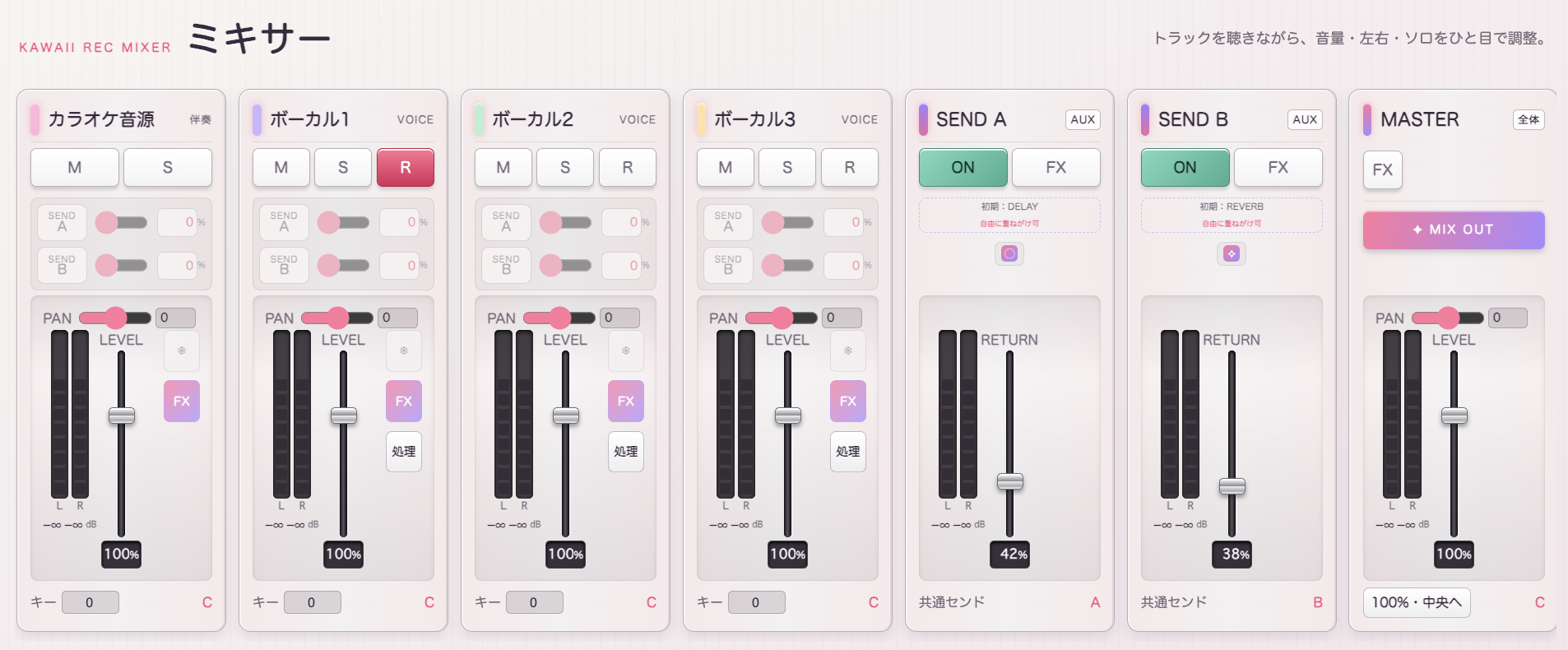
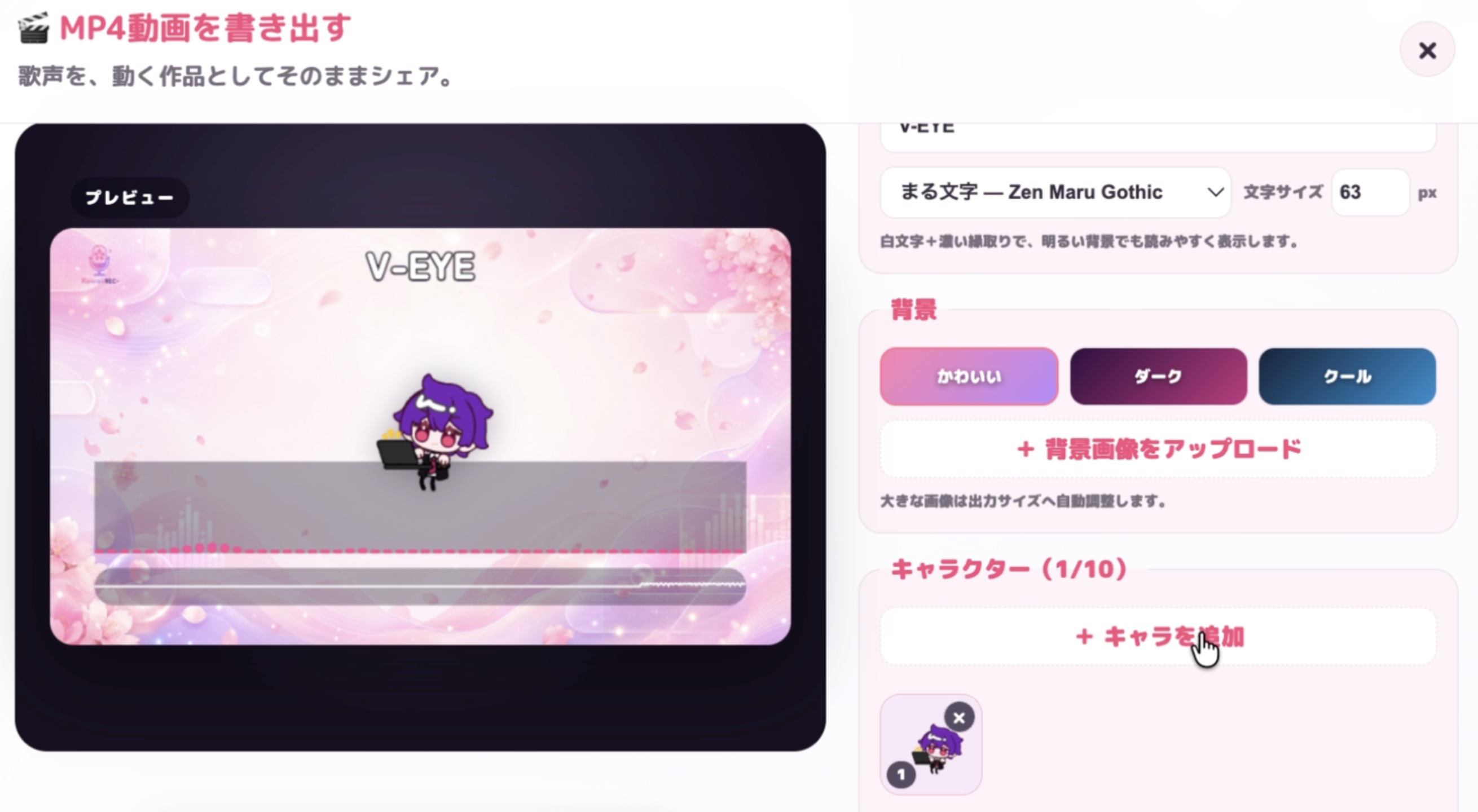
Mixer and SEND routing, Kawaii Effects Rack, animated MV export, MCP controls, and invitation rewards now connect your whole workflow.

See everything in v1.10 Nova
MIXER + SEND

Shape every track

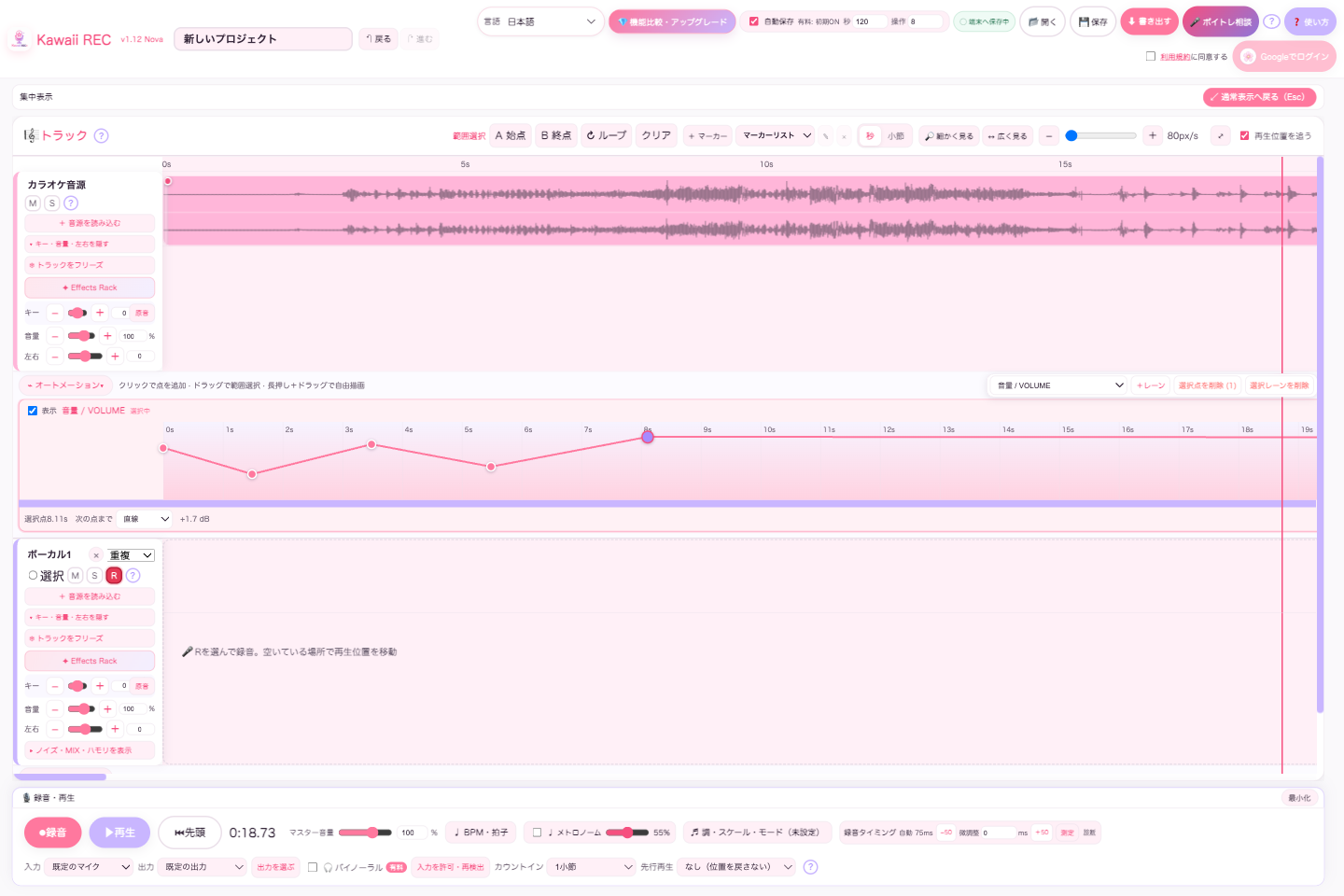
Balance tracks, buses, and master with stereo meters, pan, and FX.

INVITE + CREATE

Unlock together

One qualifying invite unlocks MV export; three and five unlock more rewards.

USE CASE

One person's production is so light.

I tried singing, a short video, and voice recording. You can use it only where you need it.

Singer/VTuber

Even one person can mix songs for short videos.

Even if it's freeRecord the accompaniment and voice and adjust pitch, rhythm, and formant. You can select a MIX such as "Studio" or "Radio" and export only the required range to WAV/MP3.

If it is a paid version2 systems of automatic harmonization according to key and scale, 3 types of noise processing, and mastering for distribution. You can adjust the pitch, volume, pan, and left/right split for each harmony.

voice actor/narrator

Delivered after adjusting the environmental noise of home recording.

Even if it's freeRecord to any vocal track and trim unnecessary parts. Radio/studio MIX and formants can be used to adjust the sound to suit the role.

If it is a paid versionApply environment, lip, and sibilance processing from the silent section before MIX. It can be delivered as is in WAV.

character voice

The pitch view is the finishing touch for Beuchen.

Even if it's freeCreate a brighter, thicker voice by combining note-by-note pitch movement and formant adjustment. You can also edit the rhythm and length in detail.

If it is a paid versionUsing multiple tracks and two types of harmonies, we created an overlapping sound that resembles a fairy, chorus, or alter ego. You can also create a spread by splitting the left and right sides.

*Formant/pitch correction is audio editing after recording. It is not a voice changer for real-time calls.

Complete online now.No app download or installation required. You can open it from Chrome, Edge, or Safari on your smartphone, tablet, or PC and record directly. *The pitch/rhythm correction function is only supported when operated from a browser on a PC (Windows, Mac).
Mac versionunder developmentWindows versionunder development
Google

If you want to save it to the cloud, link your Google account.

You can try recording and editing right away. To save to the cloud and open from another environment, you need to log in with your Google account. Saving in the browser can be used without logging in.

Start linking with Google

I recorded it, but I can't finish it.

  • I don't know where to start
  • Pitch correction and MIX seem difficult
  • It takes time each time to re-record.

There's always only one thing to do next.

  • Don't get lost with our easy-to-understand Japanese guide
  • Adjust pitch/rhythm correction and MIX on screen
  • Decide the recording position and record to the required track

5 steps to complete the process without hesitation

1

insert sound source

Audio files (formats that can be played and decoded by the browser, such as MP3 / WAV / M4A / AAC / FLAC / OGG / WebM / MP4) or paid version YouTube streaming cooperation. The timeline supports second/measure display.

2

record a song

Record to the track that is in recording standby. After recording, you can drag it to another track.

3

adjust your voice

Adjust the pitch, rhythm, length, and formant of each note.

4

MIX

5 types of MIX. The paid version also includes 3 types of noise processing and 2 systems of harmonization.

5

write out

To WAV/MP3. You can choose monaural or stereo, and the paid version supports high-quality WAV of 48kHz/24bit or higher and automatic mastering.

SMARTPHONE

From recording to rough editing, you can use your smartphone.

The smartphone version shows the recording process, YouTube linkage, and track editing in a large format. The rhythm of the sound source clip can be adjusted using the "Move" tool in the center, and the start/end position can be adjusted using the "Crop" tool on the left and right edges. The seconds/measure ruler is displayed above and below, and you can play from the position you tap.

*Manual editing of pitch/rhythm correction requires detailed operations, so we recommend using it on Windows/Mac.

01

Pitch, rhythm, and tone of voice for each note.

Move the note up/down, left/right in the pitch view, and drag the edges to adjust the length. In addition to division, detailed manual editing, automatic correction of "smooth" and "kerokero", you can use formants to create a thick to bright voice.

Launch offer: pitch correction is free until August 31, 2026. Rhythm correction (auto-align, horizontal note movement, and note-length editing) is paid-only. The free pitch-correction period extends by two months each time cumulative paying users reach another 1,000-user milestone.

02

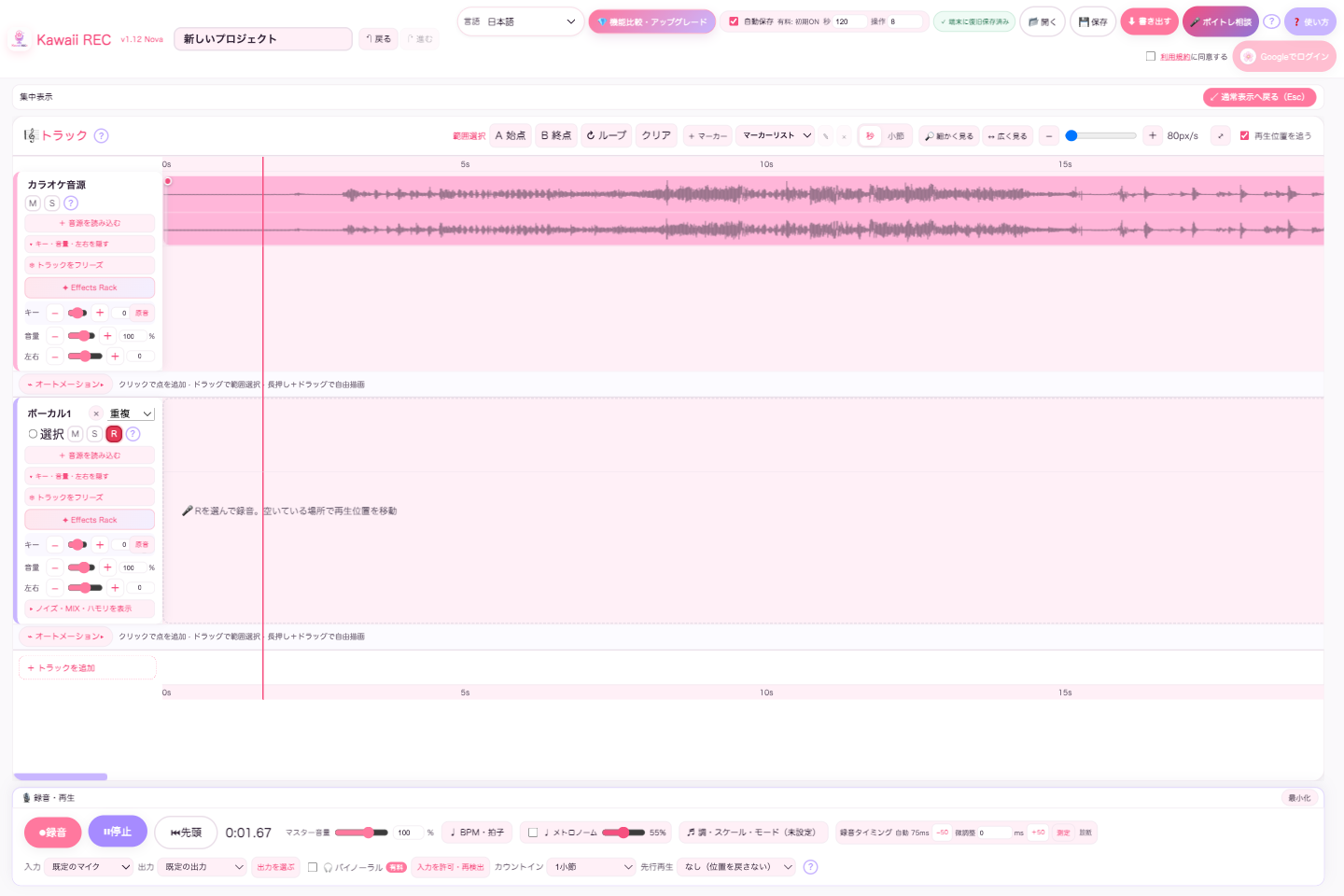
You can choose the recording destination without hesitation.

Specify the recording destination with the R button of each vocal track. In the paid version, you can apply environment, lip, and sibilance individually to the dry sound source before mixing.

karaoke sound source

Vocal 1 R ●

Paid environment / lip / sibilance

03

A mix that will come together even for the first time.

There are 5 types: ``as is'', ``studio'', ``hall'', ``radio'', and ``whisper''. For options other than "as is", the volume, peaks, and dynamics are analyzed and automatic gain, EQ, compressor, etc. are applied. You can also adjust the amount of resonance.

04

You can choose the export quality according to your needs.

Supports WAV/MP3, monaural/stereo, and range export. The free version allows you to choose 44.1kHz/16bit WAV and MP3 192kbps, and the paid version allows you to choose high-quality WAV of 48kHz/24bit, 96kHz/24bit, 192kHz/24bit and automatic mastering.

Mono/Stereo48k/24bitWAV/MP3
05

BPM and odd time signatures can be added to the timeline.

In addition to the basic BPM and time signature, you can also change the tempo and change the time signature during the song. In the paid version, you can analyze the loaded accompaniment and automatically estimate the BPM.

06

Use YouTube as accompaniment without saving it.

The paid version of YouTube cooperation allows streaming playback with the official embedded player. It supports display/hide switching, mute/solo, and can be used as accompaniment during recording. Video and audio will not be saved and will not be included in the export.

07

Write out only the necessary range, connecting them naturally.

Specify the A/B position and play the parts you are weak at in a loop. You can create fade ins and outs using the top left/top right handles of the clip, and export only the set range to WAV/MP3. You can clear the loop range later.

08

Consult with voice training teacher Mashiro.

If you have trouble singing or speaking, a friendly and polite AI chat will suggest simple exercises. The free version allows you to consult up to 3 times a day, and the paid version allows you to consult up to 10 times a day.

Please tell me your problem

We will show you exercises that you can try right away.

receive proper guidance

09

Two systems of automatic harmonization in line with music theory.

Choose from 7 modes: major/minor, blues, pentatonic. It also supports not setting/clearing later. The paid version generates two harmonies of 2 to 7 degrees above and below, 1 and 2 octaves, and allows you to adjust the volume, pan, and left/right split individually.

Key: A minor

Harmony 1 +3rd Volume 52%

Harmony 2 -Octave left and right 35%

10

Easy to operate on PC or smartphone.

On a PC, you can centrally display recordings, YouTube, tracks, and sound pitches. On smartphones, recording, YouTube linkage, track recording/editing are displayed in a large size, and support is provided for moving/cropping the sound source, bottom ruler, and export progress popup.

Plans & feature comparison

Monthly, yearly, and buyout plans include the same Kawaii REC features. Only the billing period and update guarantee differ; add-ons are shown separately.

functionFree versionPaid version
Reference melody guideAnalyze and display a vocal-only trackFree features + extract the lead vocal from a full mix
Metronome linked to BPM and meter
Audio reading/microphone recording
Supported audio formatsMP3 / WAV / M4A / AAC / FLAC / OGG / WebM / MP4 etc.
Browser compatible format
Recording standby/clip movement/trimming
Fade in/fade out
Mobile version move/crop tool
Pitch correction / note splittingFree until August 31, 2026
Extended when milestones are met
formant correction
Automatic MIX preset reverbAs it is / Studio / Hall / Radio / Whisper
Key/scale/mode settings
Concentrated display/Back/Forward
BPM, time signature, tempo map, odd time signature
Range loop/range export
Export WAV/MP3WAV 44.1kHz/16bit, MP3 192kbps
Mono/stereo selection
Free version specifications + 48/96/192kHz 24bit WAV
automatic mastering
Export progress popup
Voice training AI consultation3 times a day10 times a day
10 hours trial releaseUp to 3 times after verifying your card with StripeAlways use paid features
auto saveManual ON
Mainly saves locally when not logged in
Initial ON
Cloud capacity up to 8GB
Number of tracksmax 3unlimited
cloud projectInitial 1 + monthly additions (maximum 12)
Up to 1GB capacity
unlimited
Up to 8GB capacity
updateScope of free versionOne-time purchase: Purchase version
Subscription: Always the latest version
Base-plan feature parityRecording and basic editingMonthly, yearly, and buyout plans have the same Kawaii REC features.
Kawaii Effects Rack FULLSeparate add-onJPY 7,000 normally; JPY 5,000 through Aug 31. Annual/buyout owners: JPY 5,000 from September.
VST3 / AU editionInstaller free; export requires a licenseIncluded with FULL, with the same functionality and a different UI.

*The pitch/rhythm correction function is only supported when operated from a browser on a PC (Windows, Mac). You can mainly use it for recording, track editing, MIX, and export on smartphones and tablets.

*After August 31, 2026, free pitch correction extends by two months each time cumulative paying users reach another 1,000-user milestone. Rhythm correction is paid-only regardless of the campaign period. “Cumulative paying users” means users who have entered paid mode at least once through a payment or paid code; trials and free codes are excluded.

*Effects Rack FULL is auto-included for existing annual/buyout owners only until 12:00 JST on Aug 12. From 12:00 JST through Aug 31, it is included at no extra charge for buyout purchasers. From September, the standard price is JPY 7,000; annual/buyout owners pay JPY 5,000. The VST3/AU installer is free to download, but export requires a valid license.

Plan that suits your activities

Start for free. You can upgrade only when you need it.

Free-account data retention: If you do not sign in for 12 months after your last login, cloud audio, projects, account information, and other service data will be deleted. Keep important audio on your device as well. Active paid plans are excluded.

free

¥0
  • Up to 3 total tracks including accompaniment
  • Log in once a month to get +1 cloud quota/up to 1GB capacity
  • Basic recording, correction, MIX, and export
  • Get a 10-hour trial by verifying your Stripe card (up to 3 times)
Get started for free

annual amount

¥5,000/year
  • Monthly equivalent: Approximately 417 yen
  • Same features as monthly plan
  • Always the latest version
Start with annual amount

one-time purchase

¥11,000
  • Unlimited tracks and permanent use of the purchased version
  • Latest updates guaranteed for 2 years from purchase
  • 20% off the standard price of paid major upgrades after that period
  • No additional monthly fees
Use as a one-time purchase

Gift

🎁 Give Kawaii REC to a voice creator

Purchase a 1-year plan (¥5,000) or lifetime plan (¥11,000) through KOMOJU and receive a special code that can be redeemed once. Use it yourself or give it to a singer, voice actor, or VTuber.

It also makes a thoughtful gift for children or friends aspiring to sing or act, or as a way to support your favorite creator.

Payment methods: credit/debit card, PayPal, convenience store payment, Pay-easy, bank transfer, Rakuten Pay, Paidy, PayPay, and Merpay.

Development support

Grow Kawaii REC with donations

Kawaii REC is a personally developed app born from the desire to support future artists. We have set the price as affordable as possible so that it can reach students and those who are pursuing their dreams with all their might. If you can afford it, please support this project with an annual plan, one-off purchase, or a donation, so that we can make recording, correction, and MIX easier to understand and more cute.

Donations are voluntary support, and there are no additional features, return gifts, or paid plans available.

Pay using Stripe's secure payment page.

FAQ

Is installation required?

No need. The currently available web version allows you to record, edit, and export by simply opening it from a compatible browser. Mac and Windows versions are under development.

Do I need to log in to save?

You can save it in your browser without logging in. Google account linkage is required to save to and load from the cloud. Cloud storage capacity is 1GB for the free version and 8GB for the paid version.

Can I use VST plugins?

Native plugins are compatible with Windows and Mac versions. Built-in effects are available in the web version.

Can I export with the free version?

yes. WAV/MP3 export is also available in the free version. The maximum track limit is 3 in total, including the accompaniment track.

Can I choose the export quality?

yes. You can choose between WAV/MP3, monaural/stereo, and range export. The free version's WAV is 44.1kHz/16bit and MP3 is 192kbps. In the paid version, you can also choose high-quality WAV of 48kHz/24bit, 96kHz/24bit, and 192kHz/24bit. A progress gauge will be displayed while exporting.

What audio file formats can be loaded?

You can load audio files that your browser can play and decode, such as MP3, WAV, M4A, AAC, FLAC, OGG, WebM, and MP4. Actual compatibility varies depending on browsers and devices such as Chrome, Edge, Safari, etc. If you are unable to read the file, please convert it to MP3 or WAV and try again.

Is the audio of YouTube videos saved/exported?

no. The paid version's YouTube link is only for streaming accompaniment when recording with the official player. This is not a function to save, extract, or export videos/audio.

Can automatic mastering be used in the free version?

Automatic mastering for distribution and CD is limited to the paid version. Even in the free version, you can export WAV/MP3 without mastering.

Can noise processing be used in the free version?

Three types of noise processing (environment, lip, and sibilance) are limited to the paid version. The environment is estimated from the silent section, and the harshness of lips and sa lines can be processed individually to the dry sound source before MIX.

Can I use pitch and rhythm correction for free?

Pitch correction is free until August 31, 2026 as a launch offer. Rhythm correction (auto-align, horizontal note movement, and note-length editing) is paid-only. Both are available only in a PC browser on Windows or Mac.

Can I set the BPM and odd time signature?

yes. You can set the basic BPM/time signature and change the tempo/time signature at any position in the song. Automatic BPM measurement from accompaniment sound sources is limited to the paid version.

Please tell me about the production functions included.

You can use audio/YouTube streaming accompaniment, vocal recording, range loop/export, pitch/rhythm/formant correction, note division, key/scale setting, two-system automatic harmonization, automatic MIX, three types of noise processing, tempo map, odd time signature, BPM measurement, automatic mastering, WAV/MP3 export, intensive display, back/forward, and AI singing consultation. Some features require a paid plan.

Can I use the free version of Auto Harmony?

Setting the key, scale, and mode itself is free, but automatic harmonization generation 1 and 2 are limited to the paid version. You can adjust the upper and lower pitches, volume, pan, and left/right split for each system, and reflect them in playback and export.

How do I set the playback position and loop range?

Click the ruler where seconds or measures are displayed to move the playback position. Press A at the beginning of the loop and B at the end to enable the loop. After setting, you can adjust by dragging the left and right ends of the range. Imported sound sources can be deleted from the clip's right-click menu.

How many voice training consultations are free?

After logging in to Google, you can consult up to 3 times a day with the free version and 10 times a day with the paid version. The third time you use the free version, you will be asked to use the paid version andMr. Mashiro's voice training classWe will also guide you. If you reach the upper limit, please contact us again the next day.

How can I use the 10-hour trial release?

After logging in to Google with a free account, you can try the paid features for 10 hours from the plan screen. There is no charge, but to prevent multiple accounts from being used by the same person, we will verify your card on a secure Stripe page. Card numbers etc. are not stored on the Kawaii REC side, and card identification information derived from Stripe is limited to a maximum of 3 times.

Can I cancel my monthly/yearly plan?

Yes. After signing in with Google, open the account menu in the top-right of the app and select “Manage / cancel subscription.” Paid features remain available until the end of the current billing period.

Where can I enter the special code?

After logging in to Google, open the account menu on the top right and apply from the input field under "View plan/upgrade".

Are there any precautions when using Kawaii REC?

Kawaii REC is a web recording app developed by one developer (Yuri Mashiro). We prioritize easy-to-understand, fun, and quick operation so that as many people as possible can express themselves at a cheaper price. Therefore, we do not aim to fully support a wide range of sampling rates, bitrates, and data extensions, or to provide professional studio-quality effects. For productions that require professional quality, please consider using a DAW such as Pro Tools, Cubase, or Fender Studio, or using a professional sound engineer. Since it runs on a web browser, its behavior may vary depending on the browser, OS, and device performance. Basically, we recommend using Windows/Mac with plenty of physical memory and a large screen. Please keep the original data of important sound sources separately and save them frequently while working.

Kawaii REC宣伝大使 Nanoha。

Kawaii REC promotional ambassador: Nanoha.

A reliable and cute recording software for activists!

Whether I'm working as a voice actor or singing, it takes a lot of time to start up recording software and choose effects. However, I can start recording in 3 seconds just by clicking on the bookmark in my usual browser, and it has enough effects that I want, so I was able to save a lot of time and complete the sound source by myself!

Nanoha. See the X of
Kawaii REC開発者 真城由理

Developer: Yuri Mashiro

I hope that vocal activists can spread their wings more freely around the world.

Until now, I have been active in various areas of the sound-related doujin scene, including as a singer, voice actor, VTuber, mixer, Vocaloid P, etc. This app was created by condensing all the creative experiences I had there. Recording software is easier, cuter, and better! Enjoy this app and share your shining voice with the world!

Make your desire to sing a reality today.

With Kawaii REC, you can proceed to completion without hesitation.

Get started for free